One combined list per child
Bible, Math, Reading, walk the dog — school and chores in one place, in order. Must-dos are starred; optional items and “any 3 days a week” practice ride along.
Each child gets one daily list — school and chores together — and a Day Complete button. You get one screen showing where everyone is, with a Confirm button for each. Credits and streaks do the nagging for you.
Already a Bravo family? Turn it on in Settings › Home School.
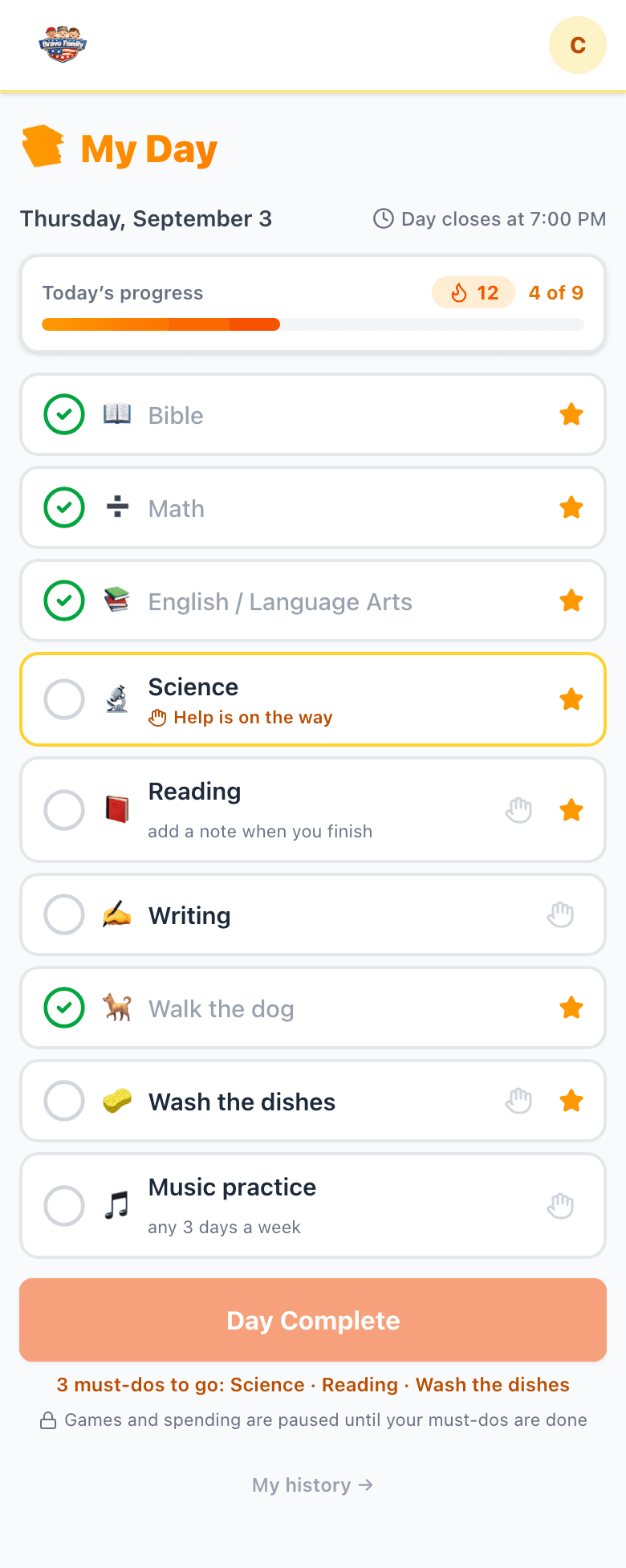
What your child sees.
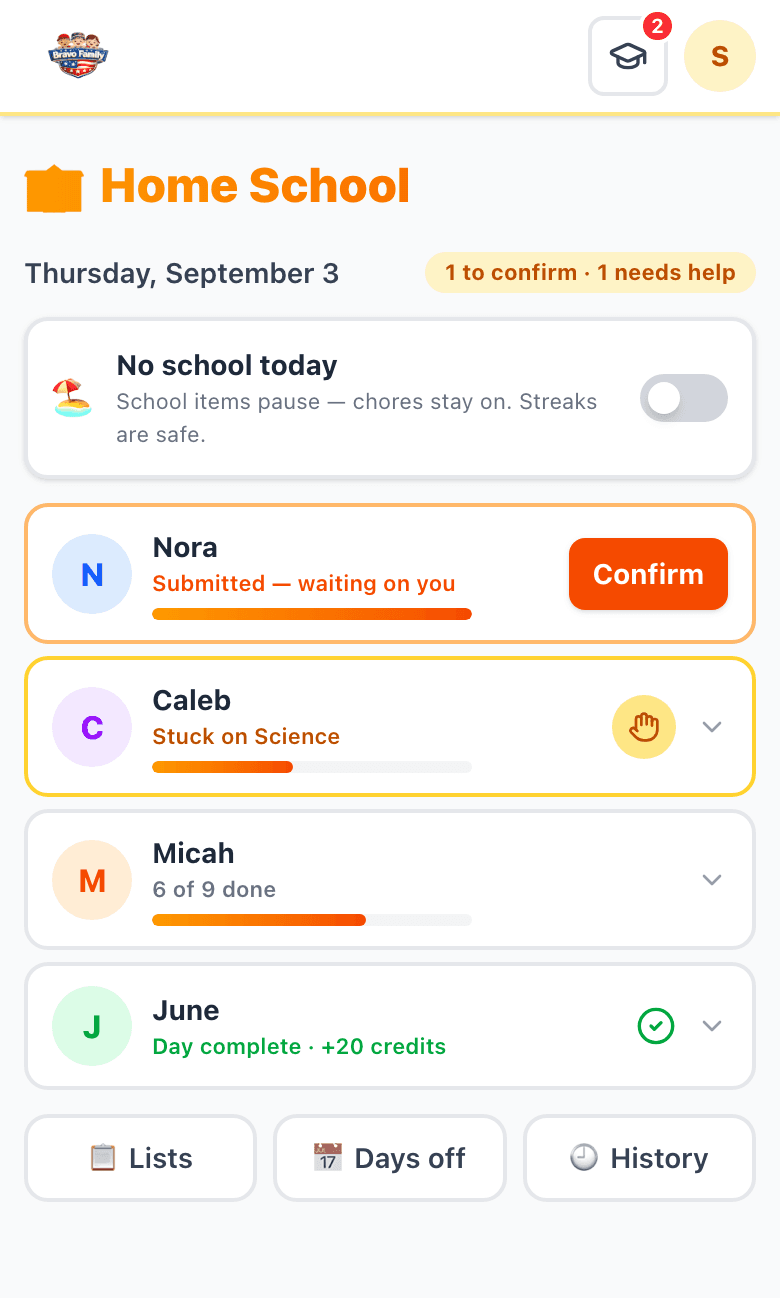
What you see.
A Bravo family who teaches at home asked us for a way to run their school day inside the app their kids already open every morning. We sent them a questionnaire — what does a good day look like, what happens when a child gets stuck, what should never break a streak — and built Home School Mode from the answers, then from the follow-up answers. It is the daily checklist and accountability layer that sits alongside whatever curriculum or co-op you already use. It is not a curriculum, and it does not try to be.
Three moments, every day. The app keeps track; you keep teaching.
They open the app onto My Day: today’s items in order, a progress bar, and their streak. Must-dos are starred. When they get stuck, they raise a hand and it comes straight to you.
The button unlocks when the last must-do is ticked. Before it sends, they answer a short honesty check rooted in Colossians 3:23. Until then, games and credit spending stay paused.
Their row on your Home screen turns orange with a Confirm button. Tap it and the day pays credits and extends the streak. Confirm all of them at once on a busy evening.
Every one of these came from a real family’s question. None of them need a manual.
Bible, Math, Reading, walk the dog — school and chores in one place, in order. Must-dos are starred; optional items and “any 3 days a week” practice ride along.
When the last must-do is ticked, your child presses Day Complete. It comes to your Home screen with a Confirm button. A confirmed day pays credits.
A child can raise a hand on any item. It pins to your screen and stays there until you clear it — even days later — so a request for help never quietly expires.
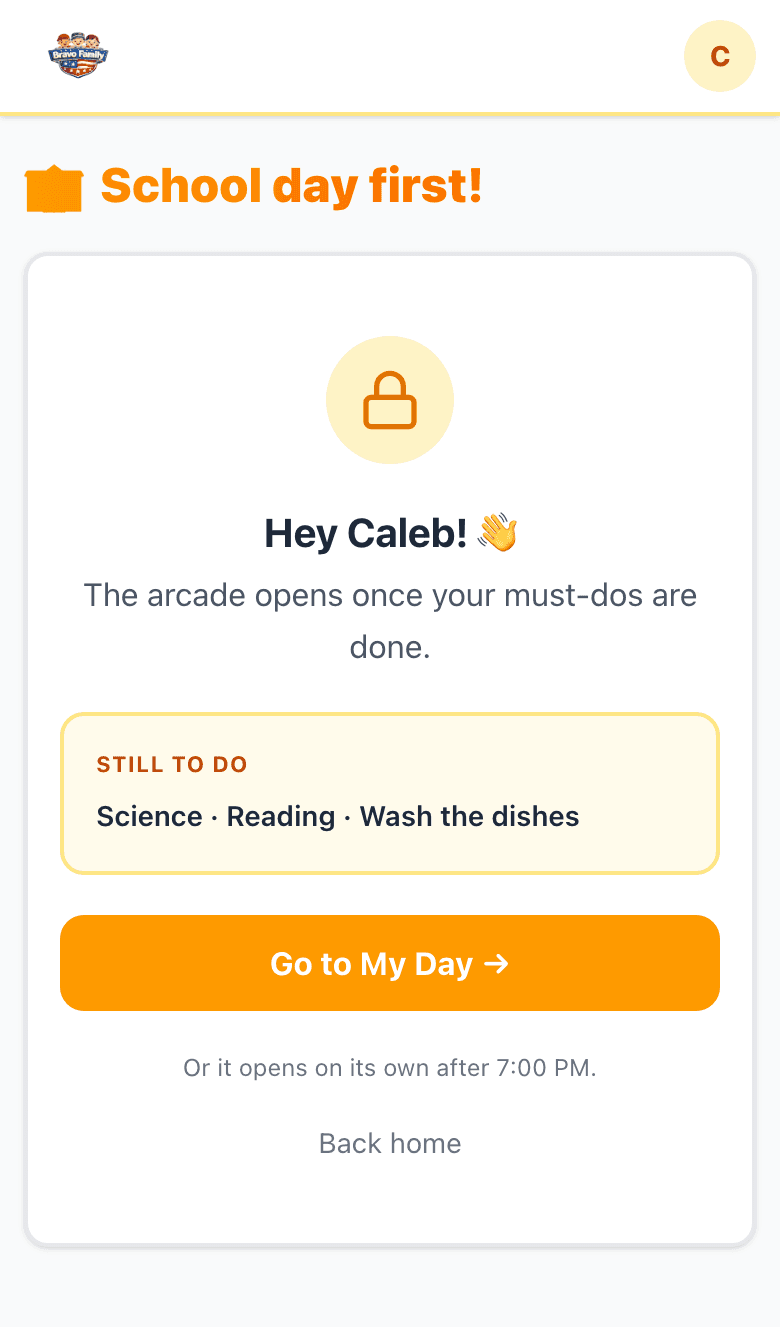
While must-dos remain, the arcade and credit spending are held shut and open the moment the last one is ticked. Earning apps keep working. Optional.
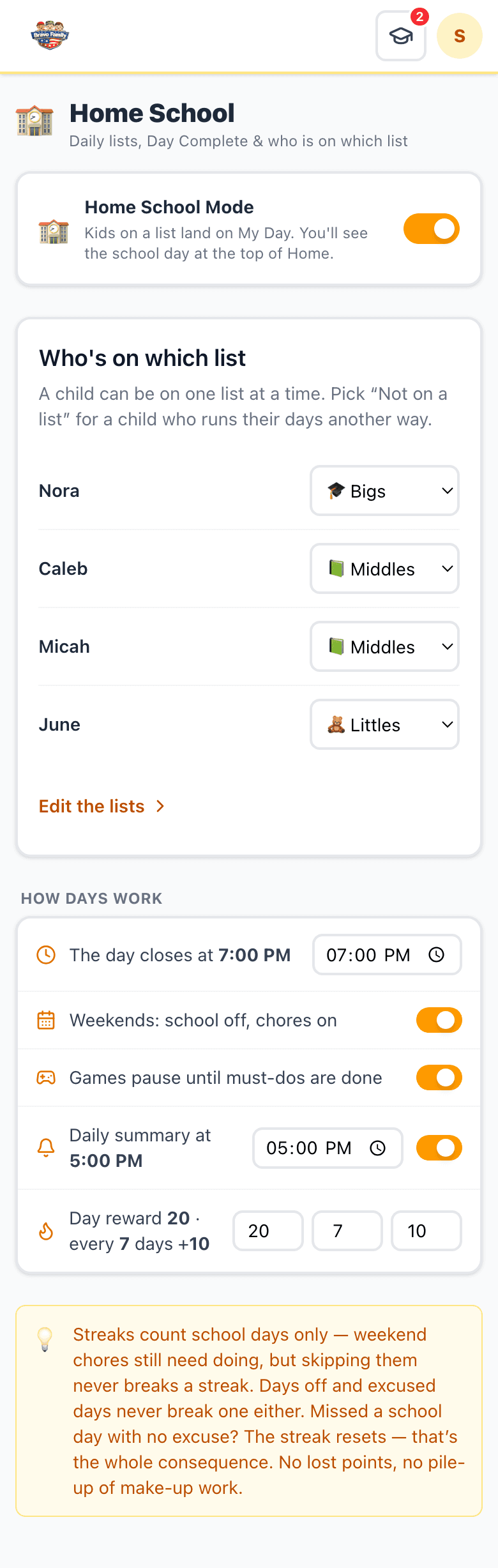
Days in a row build a streak, with a bonus every N days. You choose the day reward, the bonus, and how often it pays.
Weekends are school-off by default (chores stay on). Block out a vacation, flip “No school today”, or excuse one sick child. None of it counts as missed.
The Littles list shows big picture tiles instead of text, so a five-year-old can run their own morning and feel the same Day Complete.
Any item can ask for a short reflection and the minutes spent. The history log keeps every day, so hours are on record for a portfolio or transcript.
Turning the mode off is a pause. Lists, history, credits and streaks are all kept, and one tap turns it back on. Take one child off with “Not on a list”.
Parents find the switch where every other family setting lives. Kids never see this screen.
Three starter lists are built for you — Littles, Middles and Bigs — already filled with real subjects and chores. Edit any item.
One screen, one select per child. Anyone left on “Not on a list” keeps the app exactly as it is today.
One thing worth knowing: each child needs their own login, since each one has their own list. Bravo supports up to 10 family members.
Home School Mode gives each homeschooled child one daily list that combines schoolwork and chores, with a Day Complete button at the bottom. Parents get one screen that shows where every child is, with a Confirm button for each. A confirmed day pays credits and builds a streak. It is part of Bravo Family HQ, the credit-based Family Operating System, and any family can turn it on from Settings.
Neither. Bravo is the daily checklist and accountability layer that sits alongside whatever curriculum, co-op or online program you already use. You put your subjects on the list; the app handles the checking off, the help flags, the streaks and the rewards.
Yes. Each child is assigned to one list. Three starter lists come ready made — Littles (picture tiles for pre-readers), Middles (core subjects and chores) and Bigs (core, electives and high school) — and you can edit every item or build your own. A high schooler’s dual-enrollment course and a kindergartner’s letters live in the same family account.
It is included in Bravo Family HQ. Every family starts with 3 months free. After that it is $9.99 a month or $59 a year for the whole family, up to 10 members. Cancel any time.
They tap the hand icon on that item and can add a short note. The flag pins to the parent’s screen and stays there until a parent clears it, even if that is the next day. The child’s row shows “Stuck on Science” instead of a progress number.
No. Weekends are school-off by default (chores stay on and never affect the streak). You can plan a break, flip “No school today” for the whole family, or excuse one sick child. None of those count as a missed day. Missing a school day with no excuse resets the streak — that is the whole consequence. No lost points, no pile-up of make-up work.
Not while must-dos remain, if you leave the default on. The arcade and credit spending are held shut and open the moment the last must-do is ticked. The earning apps (Bible reading, workouts, reading log) keep working. You can switch this off in Settings.
Any item can require a short note and the minutes spent when it is checked off, and the history log keeps every day. That gives you dated notes and hours to draw on when you assemble a portfolio or transcript. It is a record, not a formal transcript generator.
Yes. Each child has their own account and their own list, and the Day Complete promise has to be their own. Bravo supports up to 10 family members, including grandparents.
Bravo is built by a Christian family and Bible is on the starter lists, but you can edit any list. Before a child sends Day Complete they answer a short honesty check rooted in Colossians 3:23 — did you do this work as unto the Lord?
Turn the mode off in Settings. That is a pause: everyone’s lists, history, credits and streaks stay exactly as they were, kids go back to the normal Home screen, and one tap turns it back on. To take just one child out, pick “Not on a list” for them.
Every family starts with 3 months free. After that it is $9.99 a month or $59 a year for the whole family — Home School Mode, the credit economy, the arcade, the faith tools and everything else. Cancel any time.
Know a homeschool family? Send them this page. We want Bravo to be an app every family can use.